Craft Pro Mini Exploration
- 3.9
- Rating
- 100.00K
- Installs
- Free
- Price
 Analysis by App-foxy
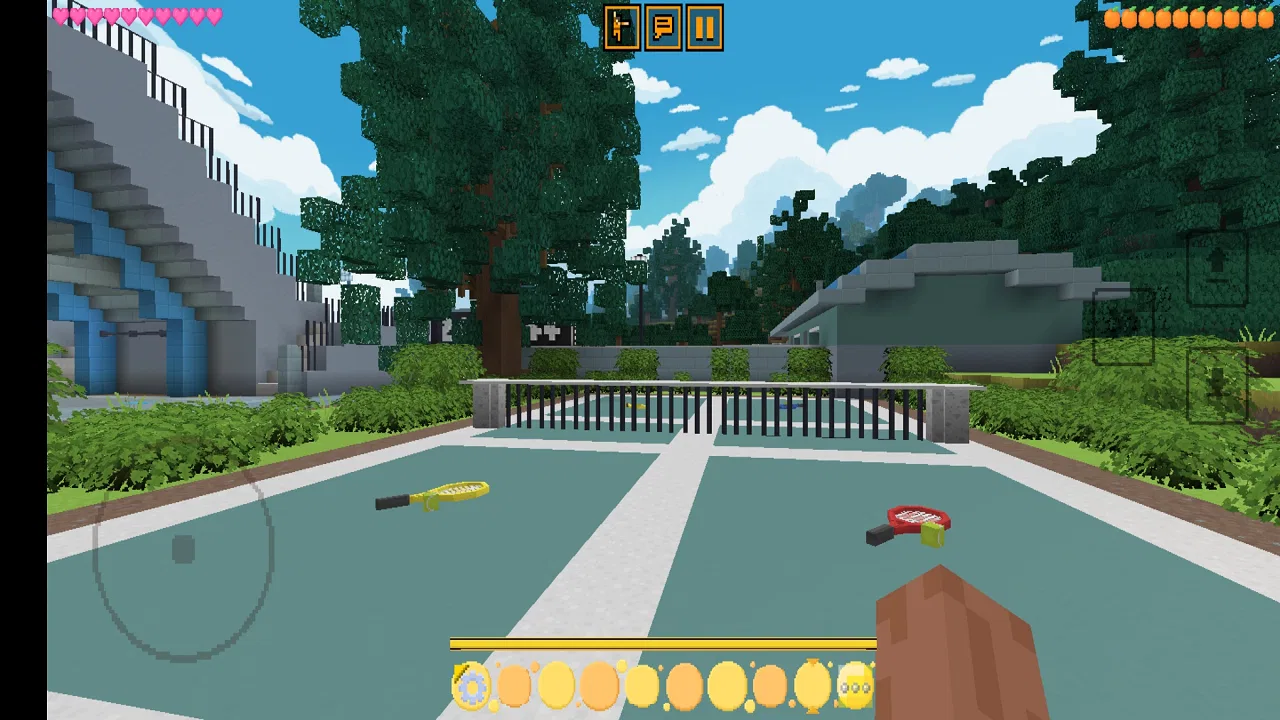
Craft Pro Mini Exploration is the kind of 3D sandbox game I open when I want a simple creative break rather than a tightly directed challenge. It comes from SentGames, is free to play, and carries an Everyone age rating, so it is easy to consider for casual play on a shared family device. The basic idea is familiar: explore a block-based world, experiment with the environment, and make your own small goals instead of following a fixed story.
That freedom is also where the game can feel unclear. A traditional trivia title gives me questions, answers, and an obvious next step. This game asks me to decide what I want to do, which can be relaxing if I enjoy experimenting but frustrating if I expect a guided tutorial. My overall impression is that it works best as a lightweight creative playground, provided I approach it with realistic expectations and take a few sensible setup steps before blaming the game for every problem.
Getting past the first points of friction
The first obstacle is not necessarily performance or controls; it is understanding what kind of experience I have installed. The store summary describes it as an interesting 3D sandbox, and that is a more useful expectation than treating it like a level-based adventure. I would not install it expecting a long campaign, a competitive trivia ladder, or a carefully paced sequence of missions. I would install it for open-ended exploration and short building sessions.
You May Also Like

 Blood Strike: 2.5 Anniversary
Blood Strike’s Loadouts Turn Every Drop Into a Tactical Gamble
A close look at Blood Strike’s custom loadouts: how fast access to signature weapons reshapes its battle royale rhythm, rewards preparation, and narrows the gap between fights.

 Pandora - Music & Podcasts
Pandora’s Music Is Easy to Start, but Harder to Recover
Pandora’s strength is its low-effort path from a seed to a station. Its weak spot is how much confidence it asks you to place in connection, setup, and quiet recovery.

 8 Ball Pool
8 Ball Pool Is Built on Rivalries, Rematches, and Routine
A close look at the rivalries, rematches, shared routines, and unanswered safety questions that turn a quick pool match into a persistent mobile community.

 Samsung Music
Samsung Music’s Quiet Strength Is Playing What You Already Own
Its reach comes less from spectacle than from dependable access to a personal library. That simplicity is both the app’s strongest retention engine and its ceiling.

 AccuWeather: Weather Radar
AccuWeather Review: A Quick, Clear Forecast for Everyday Decisions
For everyday plans, the best forecast is the one you can understand quickly. AccuWeather makes rain timing, radar, and local conditions easy to act on, with a few trade-offs.

 Hill Climb Racing
Why Hill Climb Racing Still Turns Crashes Into One More Run
A tiny car, a bumpy hill and one more upgrade: Hill Climb Racing keeps resurfacing because its simple chaos makes every near-miss feel personal.
More From Our News Desk
View All News


That distinction matters because new players often interpret a quiet opening as a missing feature. In a sandbox, an empty area can be an invitation rather than a failure state. I found it more enjoyable when I chose a small purpose before starting: make a compact shelter, map a nearby area, or create a simple visual landmark. Giving myself one modest task made the world feel less aimless without taking away the freedom that makes this type of game appealing.
Controls are another likely sticking point. On a phone, movement, looking around, and interacting with a three-dimensional environment all compete for limited screen space. If the first few minutes feel awkward, I recommend moving slowly and testing each control separately instead of trying to sprint, turn, and build at the same time. That sounds obvious, but it prevents accidental actions and helps reveal whether the problem is unfamiliarity or a genuine input issue.
I also prefer playing in short sessions at first. A ten-minute test tells me more than immediately committing to a long building project. I can check whether the camera feels comfortable, whether the device stays responsive, and whether the visual style is easy to read. If those basics work, longer sessions become much less risky. If they do not, I have lost very little time and can adjust before creating something I care about.
What to check before starting a world
Craft Pro Mini Exploration supports Android devices running version 6.0 or later, which gives it a broad compatibility range. That does not mean every supported phone will feel identical. Older hardware may handle a simple scene comfortably but become less pleasant during extended play, especially if the device is already warm or busy with other apps. I would close unnecessary background apps, make sure the phone has breathing room, and avoid judging the game while the device is performing other demanding tasks.
The current version is 2.25, so I would first check that the installed build is current through the normal app update process. This is a practical step rather than a promise that every issue disappears after updating. It simply removes one avoidable variable. If the game was installed long ago, an outdated build can make troubleshooting needlessly confusing because advice that applies to one version may not apply to another.
Storage is worth checking before beginning a serious project. Even when a game itself is not especially large, a nearly full device can behave unpredictably when apps need to save progress or create temporary files. I would leave comfortable free space, restart the phone if it has been running for a long time, and then try a short session. These are ordinary maintenance steps, but they are especially helpful for a game where losing a creative session would be more annoying than losing a quick match.
Battery level and heat can change the experience as well. I avoid testing a new world while the phone is charging under a blanket or sitting in direct sun. A warm device may reduce performance, dim the screen, or make touch input feel less consistent. If the game seems unusually slow, I let the phone cool down and repeat the same test under normal conditions before deciding that the game is at fault.
Because this is a free game, I also recommend checking the device and account basics without assuming that “free” means frictionless in every situation. A stable connection can help during installation or updates, while ordinary gameplay may feel different depending on how the app handles its current session. I would not repeatedly reinstall as a first response, especially if I have already made progress. Restarting the app and device is safer initial troubleshooting than immediately removing local content.
A recovery routine that protects creative progress
My preferred recovery routine is deliberately conservative. First, I leave the current session normally if the controls still respond. Then I close the game, wait a moment, and reopen it. If the issue remains, I restart the device and try a small test session before returning to the main project. This separates a temporary hiccup from a repeatable problem and reduces the chance that I make several changes at once without knowing which one helped.
I would be particularly careful with clearing app storage. Clearing a cache can sometimes help with temporary files, but clearing storage is a much more serious action because it may remove local progress or reset the app. I would only consider it after confirming that I am comfortable with the consequences and have checked whether the device offers a safer recovery option. For a sandbox game, protecting the world I have built is more important than following aggressive troubleshooting advice.
If a session closes unexpectedly, I would first reopen the game and look for the normal continuation point rather than immediately starting over. If the same project repeatedly causes the problem while a fresh test behaves normally, that pattern is useful information. It suggests the issue may be connected to the particular session or the amount of activity in it, not necessarily to every part of the installation. I would then keep future experiments smaller until I understand the pattern.
A useful habit is to change only one thing at a time. If I close background apps, lower device strain, reinstall the game, and alter several settings together, I cannot tell what solved the problem. A controlled approach is slower by a few minutes but much more practical. It also prevents me from damaging a working setup while chasing a problem caused by the phone rather than by Craft Pro Mini Exploration.
For building sessions, I would divide ambitious ideas into stages. Instead of trying to complete a large settlement in one sitting, I might establish the outline first, add the main structure later, and decorate only after confirming that the project is stable. This is not just a creative suggestion; it is a recovery strategy. Smaller milestones make interruptions less painful and make it easier to identify when something changed.
When the game may not be responsible
Not every pause, touch delay, or visual slowdown originates in the app. Phones can throttle themselves when hot, conserve resources when the battery is low, or struggle because several other processes are active. I have learned to compare the game with another demanding app on the same device. If both behave poorly, the wider device environment deserves attention before I blame the game.
Touchscreen problems can be misleading too. A thick screen protector, damp fingers, a dirty display, or an awkward grip can make movement appear unreliable. Cleaning the screen and testing with a lighter touch is simple, and it can distinguish an input problem from a software problem. I would also check whether the issue happens in menus as well as during exploration. If menus respond normally but camera movement feels difficult, the challenge may be learning the control layout rather than a broken installation.
Network conditions can create confusion during installation, updating, or any activity that depends on a connection. If a download stalls, I would test a reliable network, confirm that other apps can connect, and retry later rather than repeatedly tapping the same button. If the game itself runs normally after opening, that points toward a setup or connection issue rather than a problem with the world-building experience.
Account and device restrictions can matter in family settings. The Everyone rating makes the game broadly suitable from an age-label perspective, but a parent-managed phone may still restrict installations, storage access, or updates. I would check those device-level controls before changing the game itself. This is especially relevant when one person can install the app but another cannot open or update it on the same device.
Who will enjoy it, and who should choose something else?
I think the best audience is someone who likes making their own objectives. A child who enjoys arranging spaces, a casual player who wants a quiet creative activity, or a fan of block-based exploration may find enough freedom here to return regularly. It can also work as a low-pressure game for filling a short wait, because I do not need to finish a match or remember a complicated story before putting it down.
One realistic use case is an evening when I have fifteen minutes and want something more active than scrolling but less demanding than a competitive game. I can enter, choose one small construction task, explore nearby, and stop after reaching a visible milestone. The game becomes more satisfying when I treat each session as a small creative exercise rather than expecting a complete world immediately.
It is less suitable for players who need explicit objectives, fast progression, or a strong narrative hook. If I want constant rewards, detailed missions, or a polished competitive loop, a conventional adventure game or a quiz-focused title may be a better match. Likewise, someone looking for a deep construction simulator should check whether this lighter experience offers the level of control they want before investing much time in a large project.
Compared with usual alternatives in the sandbox category, its likely advantage is approachability. A smaller, straightforward creative game can be easier to pick up than a feature-heavy building platform. The trade-off is that I should not expect the same depth, variety, or long-term structure associated with larger sandbox games. The choice comes down to whether I value a simple starting point more than an extensive system of progression and customization.
The rating sits at around 3.9 from roughly 680 ratings, and the game has passed 100K installs. Those figures suggest a real audience, but they do not replace personal testing. A sandbox can appeal strongly to one player and feel empty to another because enjoyment depends heavily on tolerance for self-directed play. I would read the rating as a reason to try it carefully, not as proof that it will fit every phone or preference.
SentGames has kept the product positioning clear enough for me: this is a free trivia-category listing only in the sense of store organization? No—my experience of the game itself is firmly about exploration and creation, not answering questions. That distinction is important for anyone browsing quickly through app categories. I would focus on the actual sandbox description and screenshots when deciding, rather than assuming every casual game offers the same kind of session.
Small habits that make the game easier to live with
I recommend beginning with a compact project near a recognizable starting point. A small base gives me a place to return to and reduces the mental effort of remembering where I was. Once that area feels familiar, exploration becomes more enjoyable because I can compare new surroundings with something I have already shaped.
I also avoid changing too many things during one experiment. If I am learning movement, I focus on movement. If I am testing construction, I use a simple design. This makes the controls easier to understand and helps me notice whether a problem comes from my technique, the device, or the game state. It is a particularly useful approach for younger players who may otherwise interpret every accidental action as a fault.
For shared devices, I would agree on a simple play routine before handing the phone to someone else. Saving or exiting normally, avoiding unnecessary storage changes, and leaving enough battery for the next user can prevent avoidable arguments. The game’s creative nature makes it tempting to pass the device around, but shared use also increases the chance of someone accidentally altering a project they did not create.
Finally, I would keep expectations proportional to the free format. Free access is a strong reason to test the game, especially for casual players, but it does not guarantee that the experience will replace a much larger sandbox. I judge it by whether it gives me a pleasant, understandable creative session on my device, not by comparing every detail with the biggest games in the genre.
My practical verdict
After looking at the experience as both a game and a mobile app, I see Craft Pro Mini Exploration as a reasonable choice for relaxed block-based exploration. Its strongest quality is the freedom to decide what counts as progress. Its main weakness is the same freedom: players who need direction may feel that the game does not explain enough or provide a strong reason to continue.
The setup is straightforward on compatible Android devices, but I would still update to version 2.25, check storage, reduce background load, and test the controls in a short session. Those steps are more useful than immediately reinstalling or clearing all app data. When something goes wrong, I would separate device heat, touch-screen conditions, network trouble, and account restrictions from problems that happen only inside the game.
For me, the deciding question is simple: do I want an open creative space or a guided game? If the answer is the former, the free price and Everyone rating make this an easy experiment. If I want missions, deep systems, or a highly competitive loop, I would choose a more specialized alternative instead. My recommendation is to try it with one small project first, then keep it only if the freedom feels rewarding rather than empty.
FAQs for Craft Pro Mini Exploration
01What is Craft Pro Mini Exploration?
Craft Pro Mini Exploration is a sandbox-style building and adventure game centered on exploring block-based worlds, collecting materials, and creating structures. Its miniature visual style makes the environments feel approachable, while the open-ended gameplay lets you decide whether to focus on construction, discovery, resource gathering, or simple experimentation. The exact features and available modes may vary depending on the version installed.
02Can I play Craft Pro Mini Exploration offline?
The game may support offline play for its main exploration and building activities, which is useful when you are traveling or have no stable internet connection. However, some functions can still require connectivity, such as advertisements, updates, cloud-related services, or optional online features. Before downloading, check the current store description and test the game in airplane mode, since offline availability can change between releases.
03Is Craft Pro Mini Exploration suitable for children?
Craft Pro Mini Exploration uses simple block-building mechanics that can appeal to younger players, but parents should review the store rating, permissions, advertisements, and any communication or online functions before installation. Depending on the version, the game may include ads or purchases. It is also wise to enable parental controls and supervise playtime, especially if children can access external links or spending features.
04Does Craft Pro Mini Exploration include in-app purchases or advertisements?
Many free mobile sandbox games use advertising or optional purchases to support development, and Craft Pro Mini Exploration may follow a similar model. Ads can appear between activities or when claiming certain rewards, while purchases might remove advertising or unlock additional content. Because pricing and monetization can change with updates, review the official listing and payment settings carefully before downloading or allowing a child to play.
05What devices are compatible with Craft Pro Mini Exploration?
Compatibility depends on the operating system, required version, available storage, and the specific release distributed through the app store. The game should run best on reasonably modern Android or iOS devices with enough memory for a smooth experience, although older phones may experience slower loading, reduced graphics quality, or crashes. Check the official download page for current requirements and keep your system updated before installing.
Pros
- Simple controls make exploration easy for younger players.
- Creative building encourages imagination and open-ended play.
- Low-pressure gameplay lets players explore at their own pace.
- Compact worlds load quickly on most modern mobile devices.
- Offline play is useful when traveling or without internet access.
Cons
- Limited world variety can make exploration feel repetitive over time.
- Some features may be restricted compared with larger sandbox games.
- Touch controls can feel imprecise during detailed building.
- Graphics are basic and may not appeal to players seeking realism.
- Ads or optional purchases may interrupt the otherwise relaxed experience.

Craft Pro Mini Exploration
Gallery